Close a purchase order so that it takes no more invoice
What it is for
A completed purchase order should not receive any more supplier invoices: everything planned has been delivered and invoiced. To close it, move it to a status of type Closed. An order in such a status:
- can no longer be changed;
- is no longer offered in the Purchase order field of a purchase invoice, when keying in a scanned invoice, or in the goods receipt list;
- no longer shows the « Generate invoice » and « Create a goods receipt » actions;
- refuses any new invoice, including through the API or an import, with the message below.
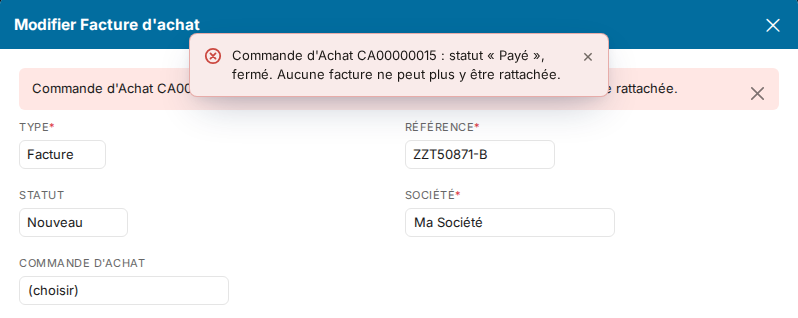
Invoices already linked to the order remain editable, and a credit note can still be linked to it.
1. Create the « Closed » status
- Open the Purchasing module settings, Purchasing section, then Status.
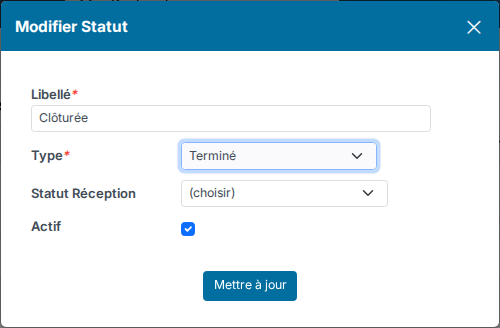
- Create a status, name it « Closed » for instance, and choose the type Closed. Leave the Reception status field empty.
2. Add it to the order workflow
- Still in the Purchasing section, open Workflows, then the workflow your order types use.
- Add the « Closed » step, then a transition to it from the steps where an order can be completed (Validated, Sent…).
- To be able to reopen an order closed by mistake, also add a transition from « Closed » back to an open step.
The order is then closed with the status button shown below it.
Good to know
- Other statuses of type Closed, Closed with success, Closed with failure or Canceled close the order too.
- A status that carries a Reception status (for instance « Received ») does not close the order for invoicing: it is set automatically on reception, before the invoice comes in.
Were this information helpful?