Card-paid purchase invoices: record the payment on import
An invoice paid online by card is already settled when you receive it. Instead of adding its payment by hand after the import, tick Paid on receipt on the card's payment mode: Nicoka records the payment as soon as the invoice is validated.
1. Tick the option on the payment mode
- In the side menu, open Customizing > Store, then click Customize on the Purchasing card.
- Expand the Purchasing section and click Payment Modes.
- Click the pencil icon of your card's payment mode, tick Paid on receipt, then click Update.
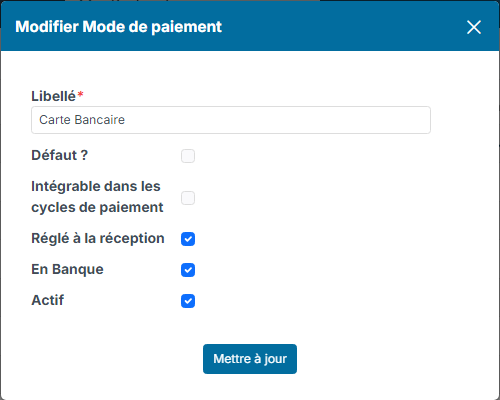
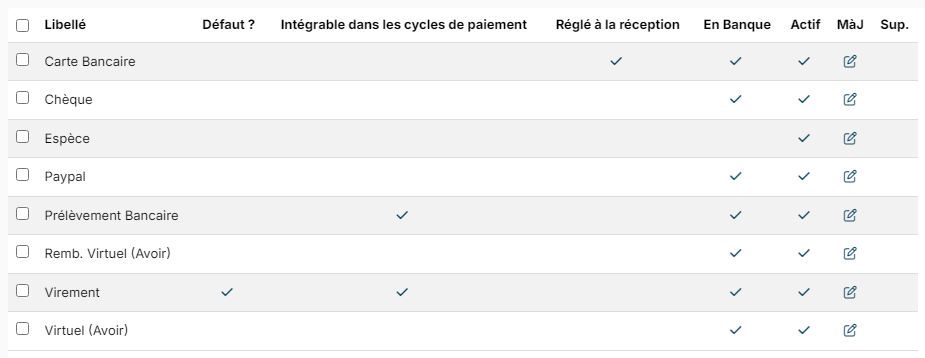
If you have one mode per card (one card per partner, for instance), tick each of them. The Paid on receipt column of the list shows the modes concerned.
2. Import your invoices as usual
Import the invoice from its PDF (Import button of the purchase invoice list), then validate it. The payment mode offered is the supplier's: set the card's mode in the Payments block of the record of each supplier you pay by card. If your validation form shows the Payment mode field, you can also pick the card used for this invoice there.
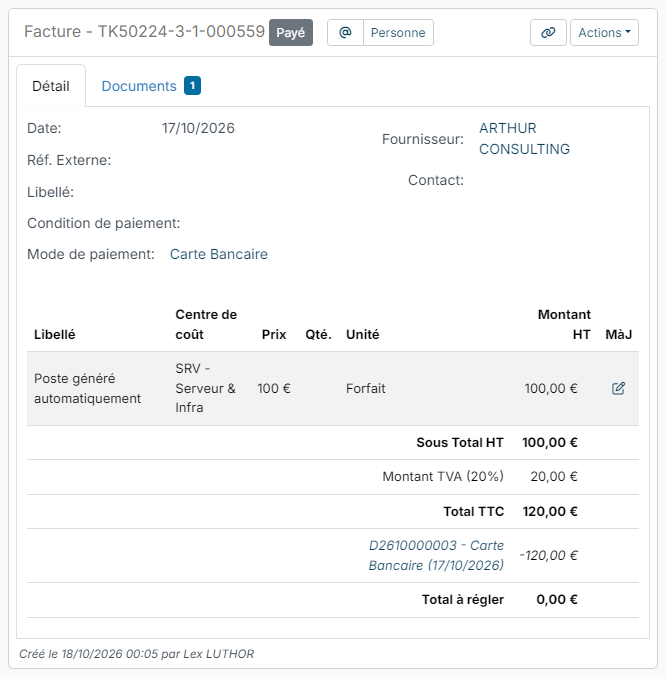
On validation, Nicoka creates the invoice payment: total amount including tax, invoice date and the invoice's payment mode. The invoice moves to the Paid status and its amount due drops to 0.
Good to know
- The payment is dated on the invoice date. If the card was charged on another date, or another card was used, edit the payment from the invoice.
- Only invoices imported from their PDF are concerned. An invoice created by hand, with no amount at first, is still paid through Actions > Add a payment. A credit note never gets an automatic payment.
- An invoice received through e-invoicing and paid this way can no longer be refused or disputed on the platform while its payment exists.
- If your workflow puts the imported invoice in a status awaiting validation, its payment is not recorded automatically: it is entered after the validation, as today.
- If the payment could not be recorded, a message tells you so at validation time: then add it from the invoice.
- A deactivated payment mode no longer creates payments, even if the option stays ticked.