Invoice numbering
In Nicoka, every document with a reference is numbered automatically: quotations, orders, contracts, invoices, credit notes, payments, but also customers or projects. This article describes the numbering of the Sales module; the other modules work the same way.
Open the document numbering
- In the side menu, open Customizing > Store, then click Customize on the Sales card.
- Expand the Sales section and click Numbering.
The list shows one numbering per document type: the Entity (quotation, order, invoice, payment), the Type, the Can be overwritten box, the numbering followed in Same numbering as the following and the Current Number, that is the last number given. The icon of the Change Logs column shows the changes made to the numbering.
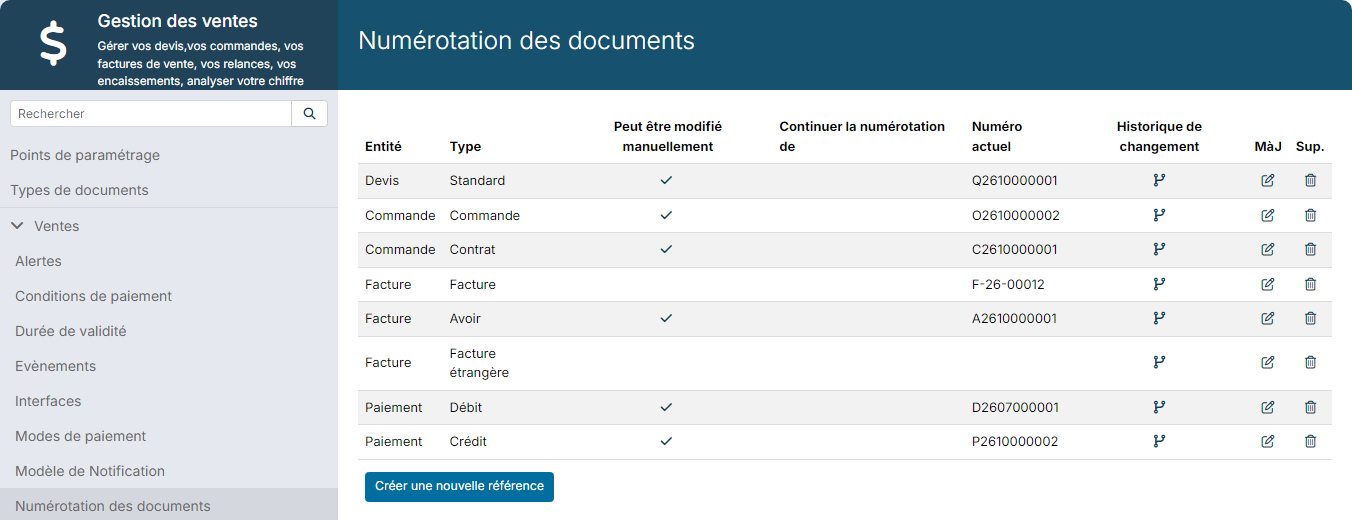
To number a document type that is not in the list, click Create a new reference.
Change a numbering
Click the pencil icon of the row, for example the invoice row. The edit window opens; the Entity and the Type can no longer be changed after creation.
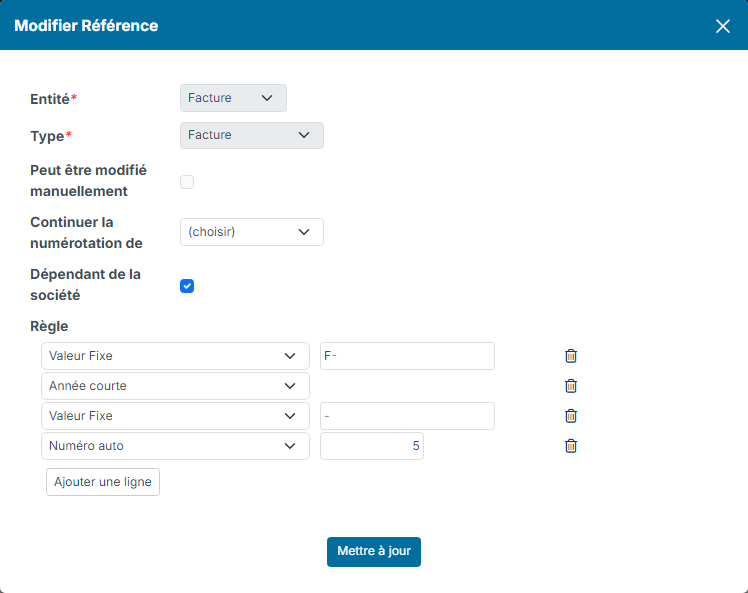
- Can be overwritten: when ticked, the reference of a document of this type can be entered or corrected by hand. When unticked, the reference is given by Nicoka and cannot be changed.
- Same numbering as the following: choose another type of the same document to share its numbering. Both types then follow a single series, and the rule of the other type applies.
- Depends on company: if you manage several companies in Nicoka, tick this box so that each company has its own series. The same invoice number can then exist in two different companies.
- Rule: how the number is built. Each row is one part of it, in order. Add row adds a part; the bin icon removes it.
Click Update to save. Documents already numbered keep their reference: the new rule applies to the next ones.
The parts of the rule
- Fix value: a text that never changes, for example a prefix (INV, F-) or a separator (-).
- Auto Number: the counter, which increases with each new document. The field on the right sets its number of digits, padded with zeros: with 5, the first invoice gets 00001.
- Auto Integer Number: the counter, without leading zeros (1, 2, 3…).
- Year and Year short: the current year when the number is given, on 4 or 2 digits.
- Month and Day: the current month or day when the number is given, on 2 digits.
- Document Year, Document Year (Short), Document Month and Document Day: the same parts, taken from the document date.
- Company Code: the code entered on your company record. Useful to tell the series apart when you manage several companies.
- Location Code, Department Code and Division Code: the code of the location, department or division linked to the document, or else those of the user who creates it.
- Owner Initials: the initials of the owner of the document.
- Assign To Initials: the initials of the person the document is assigned to.
- Dynamic: the value of a field of the customer account, for example its code.
Always include a counter, Auto Number or Auto Integer Number: it is what makes each number unique. Choose a large enough size: with 4 digits, the series is designed for 9,999 documents at most.
To create your invoices, see Creating and sending an invoice.