Connect your PayPal account for online invoice payment
Link your PayPal account to Nicoka so your customers can pay their invoices online. A PayPal payment button then appears on the online page of every invoice that still has an amount due, and the payment is recorded automatically in Nicoka. The setup takes a few minutes, directly in Nicoka: you have no confidential information to send to Nicoka.
Before you start
- You have a PayPal business account.
- You use the Sales Management module to issue your invoices.
- You are an administrator of your Nicoka workspace.
Step 1 — Note your PayPal merchant ID
Log in to your PayPal business account and note your merchant account ID (Merchant ID). It appears in your PayPal account settings. It is the only PayPal item Nicoka asks for: never share your PayPal password or API keys.
Step 2 — Create the payment service in Nicoka
- In the side menu, open Customizing > Store.
- On the Sales Management card, click Customize.
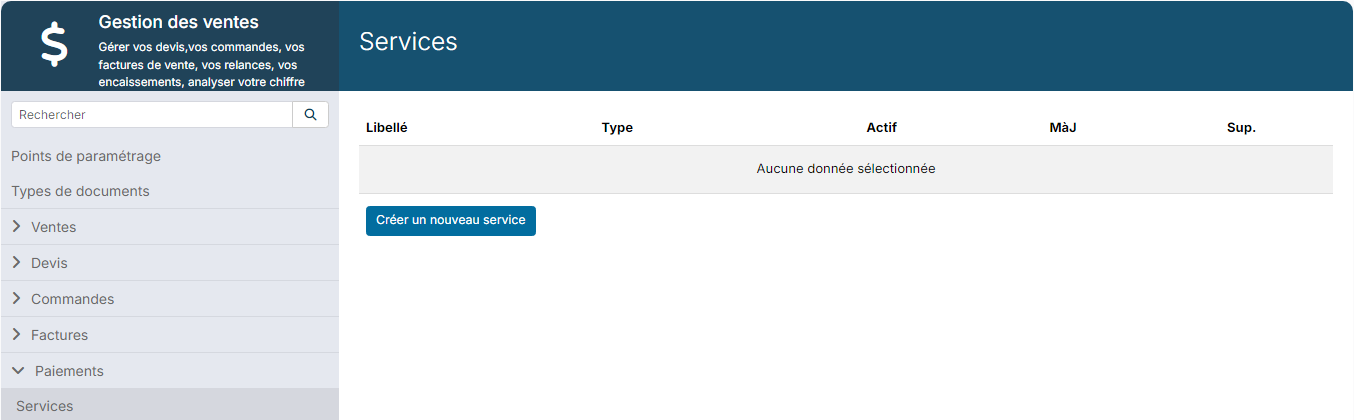
- In the left-hand menu, expand Payments, then click Services.
- Click Create a new service.
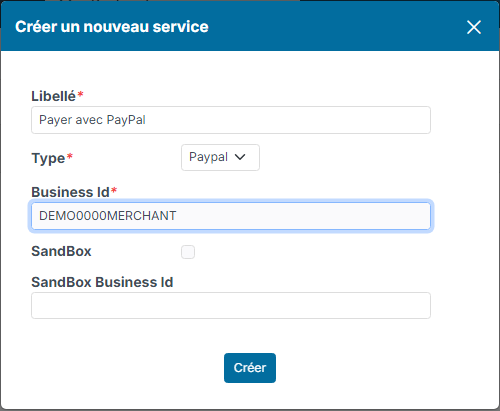
In the window that opens:
- Label: enter the text of the button your customer will see, for example "Pay with PayPal".
- Type: choose Paypal.
- Business Id: paste your PayPal merchant ID.
- SandBox: this box is ticked by default. Untick it to receive real payments. Leave it ticked only to run tests with a PayPal test account, whose ID you then enter in SandBox Business Id.
- Click Create.
The service must be active: check that the tick appears in the Active column of the list. If it does not, click in that column.
What your customer sees
Open an invoice, then click the Public link icon at the top of the record: this is the invoice's online page, the one you share with your customer. As long as an amount is still due, the PayPal button appears below the invoice, with the label chosen in step 2. Your customer pays the remaining amount, VAT included, on PayPal.
As soon as PayPal confirms the payment, Nicoka automatically records a payment on the invoice, with the PayPal payment method and the transaction reference. The same payment is never recorded twice.