Suggest a candidate's work email address
When a candidate has no work email address, Nicoka can suggest one from the other candidates of their company already in your database: if most of them use the firstname.lastname@company.com format, Nicoka applies it to the candidate.
Prerequisites
- The candidate has a first name, a last name and a current experience (no end date) at their company.
- Other candidates working at this company have a work address in Nicoka. Personal addresses (Gmail, Yahoo, Outlook…) do not count.
- The right to edit candidates.
Suggest the address
- Open the candidate's sheet.
- In the … menu of the toolbar, click Suggest the work email. The action only shows when the candidate has no work address yet.
- The window shows the suggested address and why, for instance "firstname.lastname format - 9 candidates out of 10 at Acme". Correct the address if needed, then click Save.
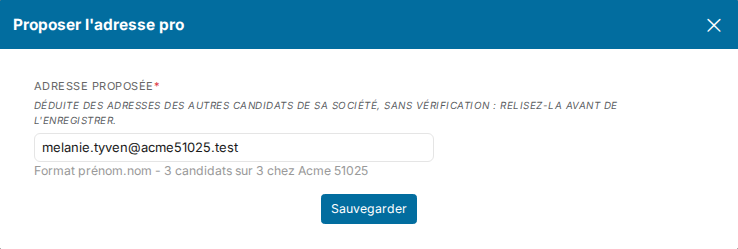
The address goes into the first free email field of the sheet. The candidate's timeline keeps a record of the enrichment, with the justification.
Good to know
- The address is deduced, not verified: check it before writing to the candidate. For a verified address, use an enrichment service (Kaspr, FullEnrich, Lusha…).
- When the candidate holds several positions, Nicoka picks the company it knows the most addresses of.
- Compound first names follow the company's habit: with or without the hyphen, as in their colleagues' addresses.
- When no colleague has a work address, the window says so and suggests nothing.
Were this information helpful?