Using index AdvertsData with Nicoka
index AdvertsData gathers published job ads (title, description, salary, location, date, company…). Once connected to Nicoka, it feeds the AdChase screen: you search job ads there, then create the matching account, contact or opportunity in your CRM in one click.
You need an index AdvertsData account whose subscription includes access to this integration: check with AdvertsData.
1. Set up the index AdvertsData service
- In the side menu, open Customizing > Administration.
- Under Cross Application, click Services, then Create a new service.
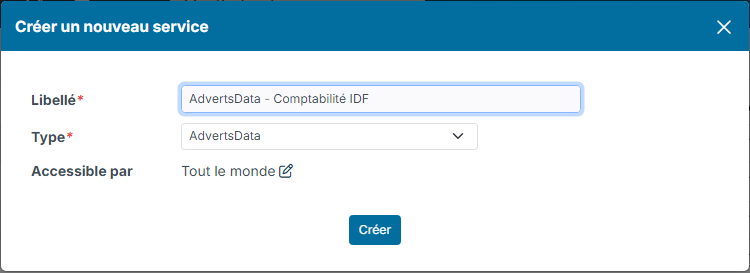
- Enter a Label that identifies the AdvertsData account you are connecting (for example "AdvertsData - Comptabilité IDF"), choose the Type AdvertsData, then click Create.
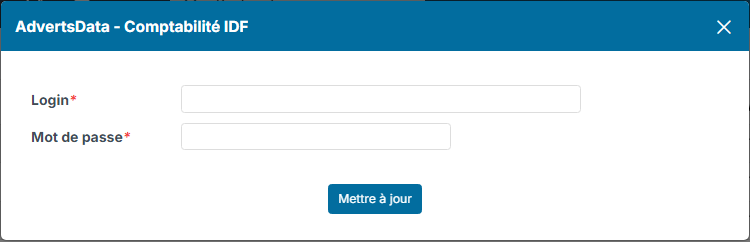
- On the line of the service, click the padlock in the Pwd column.
- Enter the Login and Password of your index AdvertsData account, then click Update.
- Activate the service by clicking in the Active column of its line.
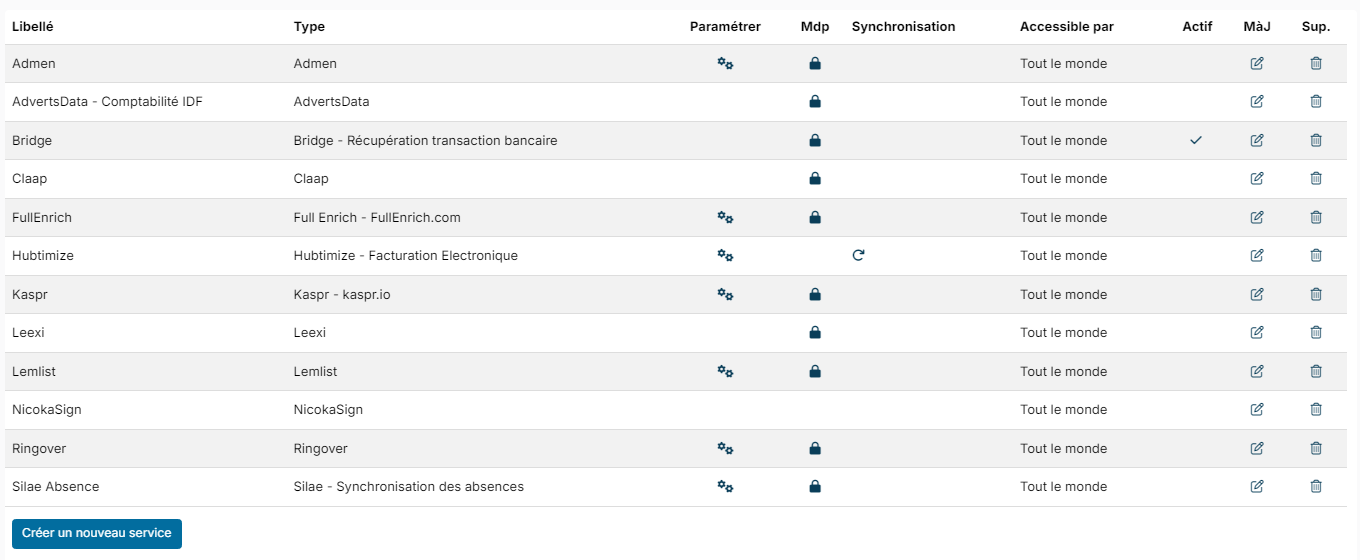
When the first AdvertsData service is activated, the AdChase entry appears in the Recruitment menu. Reload the page to see it. If you deactivate all your AdvertsData services, the entry disappears.
You can create as many services as you have index AdvertsData accounts.
2. Search job ads
- Open Recruitment > AdChase.
- Click the funnel button to show the filters.
- If you have several AdvertsData accounts, choose the one to use in the Service list.
- Fill in your criteria: period, country, region, city, job title, words in the ad, industries, company name or registration number, company size, exclusion of employment agencies…
- Click Apply Filters.
The ads are displayed in a table. In the Actions column, you can create:
- an account for the hiring company;
- a contact, only if the ad mentions a contact;
- an opportunity.
3. Search the ads of an account
You can also display a company's job ads directly on its account record. To do so, activate the AdChase module of account records:
- Open the customizing of the CRM module, then the list of modules of account records.
- Check the Active box of the AdChase module.
On an account record, the AdChase module runs the search with the account's registration number (SIRET), or with its name if it has none. You get the same filters as in the general search screen. The Actions column lets you create a contact (if the ad mentions one) or an opportunity for this account.