Supplier vigilance: keeping up with the URSSAF vigilance obligation
For any contract of at least €5,000 excl. VAT, the French Labour Code (art. L8222-1, R8222-1, D8222-5) requires you to obtain from your supplier, at the signature and every six months, its URSSAF vigilance certificate, a registration proof and the list of its foreign employees subject to a work permit, and to check the authenticity of the certificate on urssaf.fr. Otherwise you are jointly liable for its debts in case of undeclared work. Nicoka keeps this follow-up for you and the proof of your checks.
Who is concerned
Each supplier sheet carries a vigilance obligation mode, in the dropdown of the Vigilance tab:
- Automatic (default): the supplier is concerned as soon as your purchases from it over the last twelve months (committed orders or validated invoices, excl. VAT) reach the legal threshold of €5,000.
- Always required: concerned whatever the amounts, such as a subcontractor under a framework agreement.
- Exempt: never concerned, such as a public body.
The Vigilance tab of the sheet
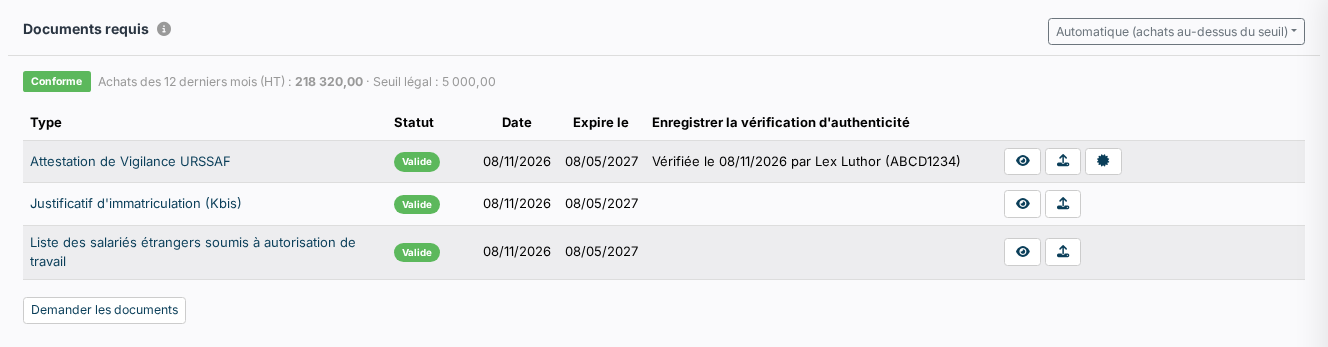
The tab lists the required documents with their state: Missing, Expired, Expiring soon (within 30 days) or Valid. The supplier status follows: Non compliant as soon as a document is missing or expired, To renew when a document expires soon or the URSSAF certificate has not been checked yet, Compliant otherwise. The status is computed at every display: an upload or a check updates it at once. The tag also shows in the header of the sheet when an action is expected.
From each row, the upload icon adds the document with the right type; the eye opens it in a window. The expiry date is read from the URSSAF certificate, or set six months after the upload for the other types.
Checking the authenticity of the certificate
The URSSAF certificate carries a security code. Enter it with the supplier's SIREN on urssaf.fr (« Vérifier une attestation »), then click the check icon of the row: state the date, the code you entered and a comment. Every check joins the checks journal under the grid, with its author and time. The journal can be downloaded: it is the register to show during an inspection. A re-uploaded certificate has to be checked again.
Asking the supplier for its documents
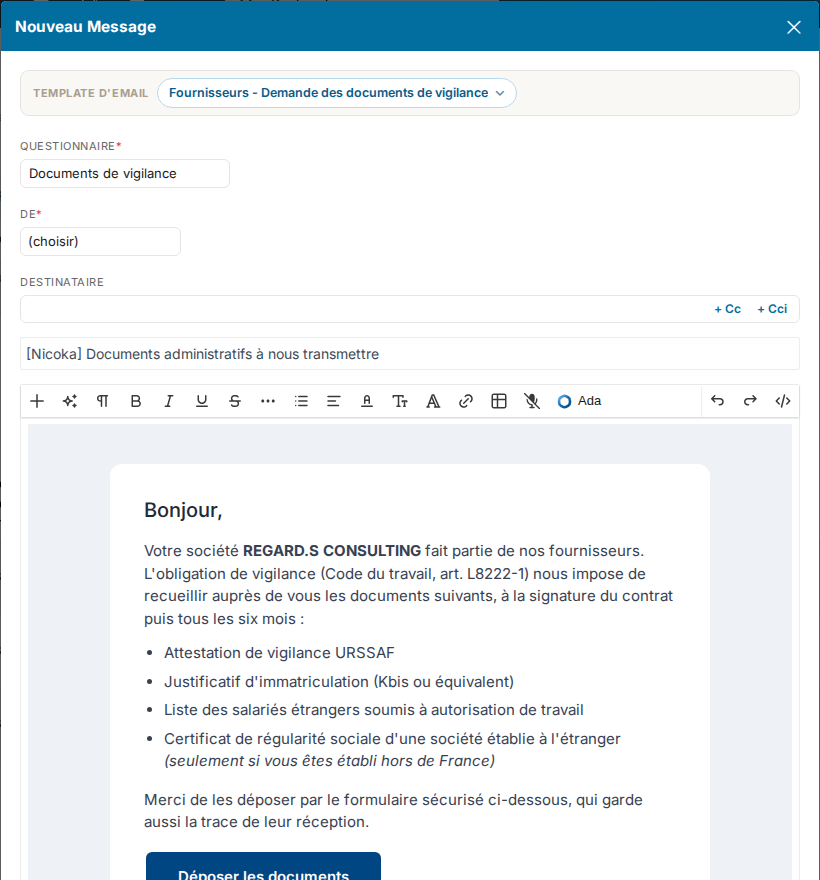
The Request the documents button opens a ready-to-send email built on the Vigilance documents questionnaire shipped with Nicoka. The supplier receives a secure link, with no account to create, and uploads each document itself: one question per document type, the first three required, the social security certificate only for a company established abroad. The files land directly on its sheet, typed and dated, and the status follows.
As long as the supplier has not answered, Nicoka reminds it automatically by email, in your name, every seven days and three times at most. Both settings can be changed on the questionnaire (Settings › Questionnaires), as on any questionnaire sent by email.
Following every supplier
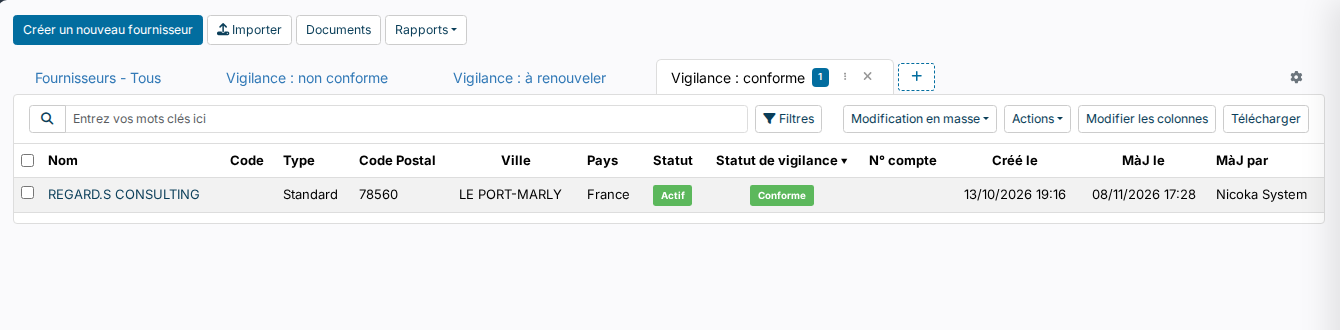
The supplier list gets three tabs, Vigilance: non compliant, Vigilance: to renew and Vigilance: compliant, and a Vigilance status column available in the filters and exports of any view. Suppliers below the threshold without the « Always required » mode are « Not concerned » and appear in neither of the first two tabs.
The alert models « Vigilance document - Expires in 30 days / 15 days / Expired » warn the owner of the sheet as the expiry of each of the four document types approaches. They are shipped inactive: activate them in Settings › Alerts.
Settings
In Settings › Purchasing, the Vigilance block sets the purchases threshold (€5,000 by default), the rolling period (12 months), the document types required from every supplier and those asked in addition from a foreign supplier, and the questionnaire sent by « Request the documents » (empty: button hidden). The tab and its actions follow the rights of the Vigilance module of the suppliers.