Import your TeamTailor data
If you use or used the TeamTailor ATS, the Nicoka team can bring part of your data into Nicoka. The migration goes through the TeamTailor API: Nicoka reads your data with an API key that you provide, then creates it in your account. The Nicoka team runs the migration; you do not have to import anything yourself.
What is migrated
- Candidates: first name, last name, email, phone and creation date. A candidate whose email already exists in Nicoka is not created again.
- Resumes: each candidate's original resume. If a candidate has no resume, the file they uploaded in TeamTailor is used as their resume.
- Notes: they are added to the candidate's profile, with their date. A note is assigned to the Nicoka user who has the same email address as its author in TeamTailor: create your users in Nicoka before the migration.
Not migrated: jobs, applications (the link between a candidate and a job, and its step) and other activities. Create your open jobs again in Nicoka, and tell your Nicoka contact about any other data you want to retrieve.
Preparing the migration
- Tell your Nicoka contact that you have TeamTailor data to migrate.
- In TeamTailor, create an API key: open the settings, then, in the integrations category, click the API keys entry.
- Create a new API key with:
- a name, for example "NICOKA";
- the Admin API scope;
- read access only (tick read).
- Send the key to your Nicoka contact through a secure channel. The person in charge of the migration then confirms with you the data to retrieve and the migration date.
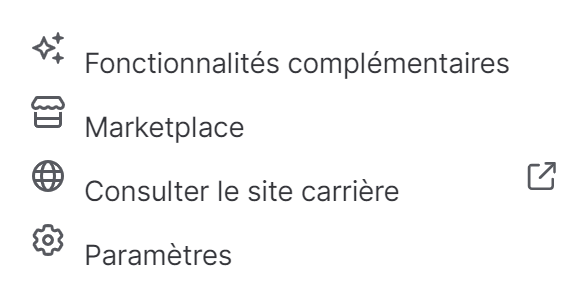
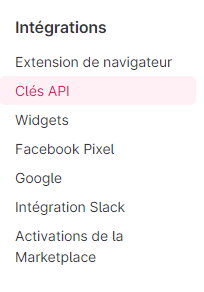
These screens belong to TeamTailor (shown here in French) and may change: if in doubt, refer to the TeamTailor help.
Points to watch
- Set the final end date of TeamTailor, and provide the API key at least two weeks before, so that the migration is done while your data is still accessible.
- The migration time depends on the volume of data: your Nicoka contact gives you the schedule.
- List the job boards whose feeds currently go through TeamTailor, and send this list to your Nicoka contact so they can be connected to Nicoka.
- Change the address of your career site so that it points to the Nicoka career site.
- Once the migration is complete, delete the API key in TeamTailor.
To migrate other data, such as your customers or contacts, see Can data be imported into Nicoka?
Were this information helpful?