Can data be imported into Nicoka?
Yes. You can import into Nicoka data coming from another tool or from a file: accounts, contacts, candidates, assignments, history of exchanges, documents…
Importing an Excel or CSV file yourself
Several lists offer an Upload button above the list, for example Contacts and Accounts in the CRM, or Suppliers.

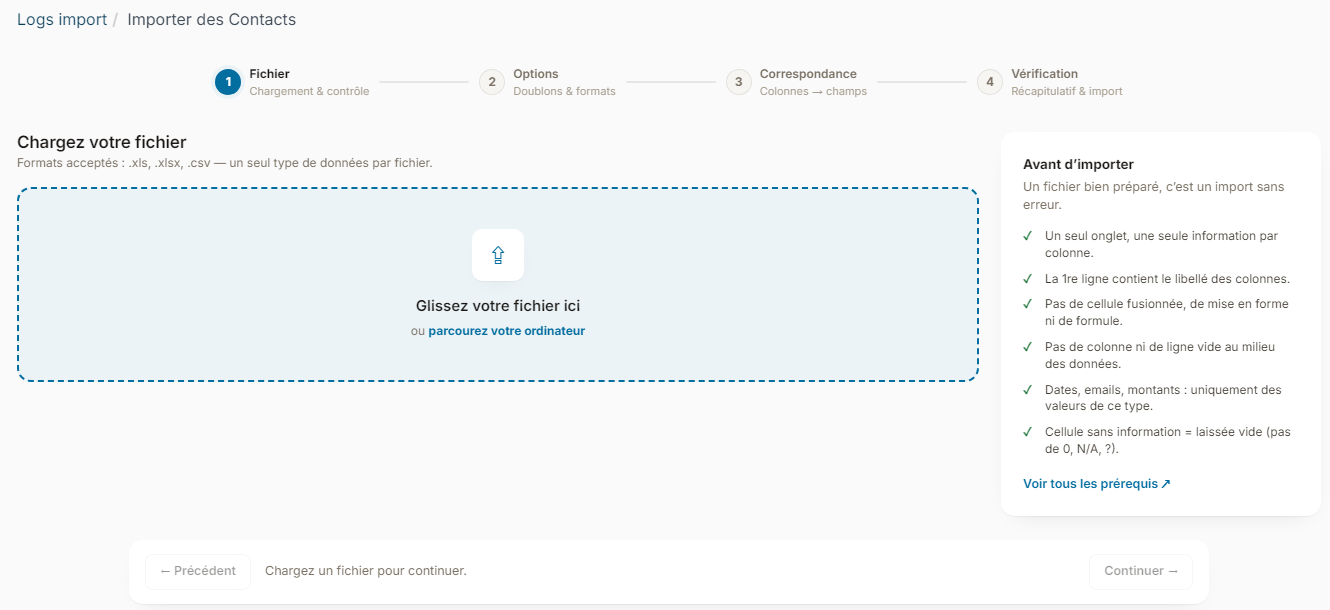
This button opens a four-step assistant:
- File: upload your file (.xls, .xlsx or .csv). Nicoka checks the file and shows a preview of the first rows.
- Options: choose what happens when a row already exists in Nicoka (Skip, Overwrite or Clone) and the date and number format.
- Mapping: link each column of your file to a Nicoka field. Obvious matches are pre-filled.
- Review: check the summary, then start the import.
The Upload button only appears if your profile has the Bulkable right on the data concerned.
The full step-by-step guide, with the example of contacts and accounts, is in Import contacts or accounts into Nicoka CRM. Before you start, prepare your file following the Data Import Prerequisites for Nicoka.
Taking over data from another software
To take over the history of another tool (candidates and their resumes, applications, exchanges, documents…) or for a file in a format other than Excel or CSV, write to support@nicoka.com. Guides exist for some tools: