Data Import Prerequisites for Nicoka
This page helps you prepare your files before importing data into Nicoka. These rules apply both to an import you start yourself with the Upload button of a list (see Can data be imported into Nicoka?) and to a data takeover carried out with the Nicoka team.
1. General rules
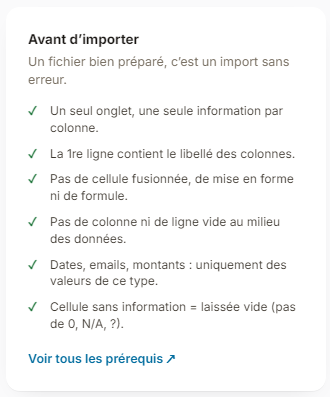
- One Excel (.xls, .xlsx) or CSV file per type of data, with a single sheet.
- The first row holds the column headings.
- One piece of information per column: for example, the last name and the first name in two separate columns.
- For postal addresses, one column for the street number and name, one for the postcode and one for the city. Nicoka works out the region and the department itself: there is no need to fill them in.
- No merged cells, no formatting (colour, bold, italics…), no formulas.
- No empty column or row in the middle of the data.
- Email, phone, amount or date columns only contain values of that type. For example, a date column only contains dates (dd/mm/yyyy or mm/dd/yyyy).
- No duplicate rows.
- If a piece of information is missing for a row, leave the cell empty (no 0, N/A or ?).
The import assistant recalls the main rules in its Before importing box.
2. Required data and duplicates, by type of data
During an import, Nicoka checks whether each row already exists. In the assistant, the Options step lets you choose what to do with a row that is already there: Skip, Overwrite (update the existing record) or Clone (create a new record).
A. Accounts (customer or prospect companies)
- Required data: the account name.
- Duplicates: an account is recognized by its external reference, its company registration number (SIRET), its email, its website or its name. If you have no registration number and the same company has several sites, add the city to the name (for example: Carrefour - Angers, Carrefour - Nantes).
B. Contacts
- Required data: the contact's last name.
- Duplicates: a contact is recognized by their email (main or secondary), their external reference, their LinkedIn identifier or their reference. Two rows must therefore not share the same email.
- The phone number is not used to recognize a contact. A switchboard number goes on the account record, not on the contact record.
C. Candidates
- Required data: the last name.
- Duplicates: a candidate is recognized by one of their emails, their LinkedIn profile (or another social network) or their external reference. The last name, first name and phone number are not enough to recognize a candidate.
D. Assignments
- Required data: the assignment label and a reference, that is a code that identifies each assignment uniquely.
- This reference is used to link applications to the right assignment.
E. Applications (link between candidates and assignments)
- Required data: the assignment reference, the step of the application in the assignment and the candidate's identifier (their email or another reference; the last name and first name are not a reliable identifier).
- Duplicates: a candidate only has one application per assignment.
F. Exchanges with candidates
- Required data: the candidate's identifier (email or another reference, not the name), the date of the exchange and the message. Without a date, today's date is used.
G. Exchanges with contacts
- Required data: the contact's identifier (not the name), the date of the exchange and the message. Without a date, today's date is used.
3. Importing documents
Documents (resumes, cover letters, contracts…) are imported with the Nicoka team: contact support@nicoka.com. To send large files, you can use a file transfer service such as WeTransfer.
A. Candidate documents
- Resumes: put all the resumes in one folder, without sub-folders, and only resumes in this folder. File names do not matter. Nicoka reads each resume, extracts its information (email, phone, address…) and links it to the candidate already imported. If a resume is not recognized, you can assign it to a candidate yourself, or create a candidate from the resume.
- Other documents (cover letters, reports, notes…): Nicoka does not read their content to find the candidate. Two organizations are possible:
- one folder per candidate, named with their first and last name (for example "Julie MARTIN"). For Nicoka to recognize the document type, name the file with this type (for example "Cover letter.pdf");
- one folder per document type, with the candidate's first and last name in each file name, always in the same place (at the start or at the end of the name).
B. Documents of accounts, contacts and assignments
The same rules apply, replacing the candidate's first and last name with:
- for an account: the name or reference of the account;
- for a contact: the contact's first and last name;
- for an assignment: the reference of the assignment.