Data access logs: understanding risk levels
Nicoka keeps a trace of the data reads made by your users and your integrations: exports, downloads, prints, bulk views, reports and API access. Each line gets an automatically computed risk level: Normal, Important, Suspicious or Critical.
This level is an indicator to spot the accesses worth a look. It does not report an incident: an Important or Suspicious level usually matches a normal use.
Opening the logs
- In the side menu, open Customizing > Admin.
- In the left-hand menu, expand Users and click Data Access Logs.
For each access, the list shows the user, the entity read, the action type, the number of records, the risk level and the request address. API accesses that read fewer than 20 records are not logged.
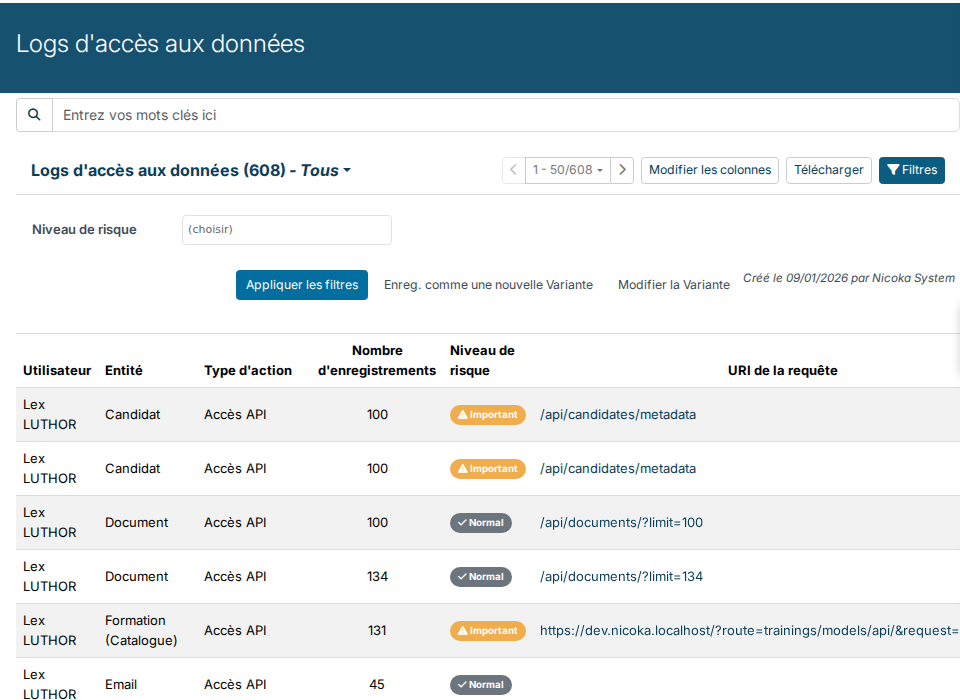
How the level is computed
Each access gets a score that adds up the following criteria:
- Sensitive data: the read covers candidates, contacts, customers or invoices (+30).
- Volume: from 100 records read at once (+20), 1,000 (+50) and 5,000 (+100). For an export, a download or a print, the thresholds are 500, 2,000 and 10,000.
- Frequency: more than 20 accesses of the same type within an hour by the same person, 10 for exports (+40).
- Time of day: an access between 11 pm and 6 am (+15).
- No filter: more than 50 records read without any filter (+10).
The total is then multiplied according to the action type: ×2 for an export, ×1.5 for a download or a print, ×1.3 for an API access, ×1.2 for a bulk view or a report, ×0.5 for a search.
| Score | Level |
|---|---|
| below 20 | Normal |
| 20 to 49 | Important |
| 50 to 99 | Suspicious |
| 100 and above | Critical |
Integrations
An integration that connects with a token (n8n, Make, an AI connector such as Claude or ChatGPT, a BI tool) reads data page by page, often at night. For it, frequency, time of day and missing filters do not count, and the volume is measured over the past hour: above one million records read in an hour.
The sensitive data rule still applies: an API access that reads at least 20 candidates, contacts or customers reaches 30 × 1.3 = 39 points, hence the Important level. This is why an integration that syncs your candidates produces many Important lines: it is working as expected.
Examples
- An AI connector reads 30 candidates: Important.
- A user runs more than 20 candidate searches within an hour: Suspicious, even when each search is legitimate.
- A user downloads a list of 600 candidates to Excel: (30 + 20) × 1.5 = 75, Suspicious.
Following the accesses that matter
- Click Filters, pick Suspicious and Critical in Risk level, then save the result as a variant to find it again.
- Look at the User column: a line under an integration account or an API user is usually part of its normal operation.
- For an access that raises a question, the Request URI tells what was read, and the number of records how many.
To restrict data access to some profiles, see Define access profiles in Nicoka.