Parse a resume with AI
AI resume analysis reads a candidate's resume and fills in their file: personal information, experiences, education, skills, languages and references. You save the time spent on data entry and your resume database stays up to date.
Analyse a candidate's resume
- In the side menu, open Recruitment > All Candidates, then open the candidate's file.
- At the top right of the file, click … (Other Actions), then Parser : AI-Powered resume Analysis.
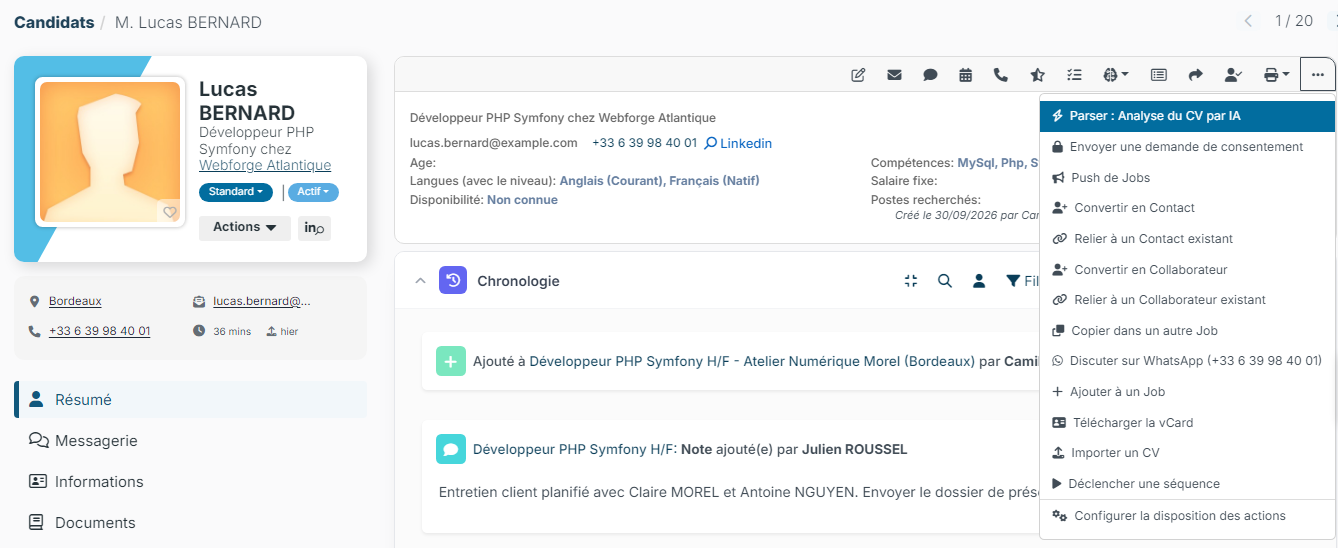
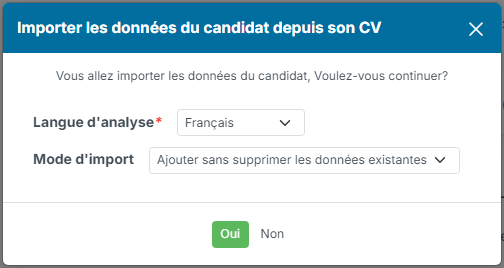
- The Import candidate data from resume window opens. Check the two settings:
- Parsing language: the language in which the extracted information is written. By default, it is the language of your interface.
- Import mode: Add / Merge (default) completes the file without removing anything. Replace existing data updates the experiences and education created by a previous analysis; those you entered yourself are always kept.
- Click Yes. A progress bar shows the steps of the analysis, then the file reloads with the extracted information.
Nicoka analyses the candidate's most recent resume. If there is none, a message tells you that no resume was found: first add their resume with … > Import a resume.
Information extracted
- Personal information: the candidate's identity and contact details.
- Comments: the summary paragraph of the resume, copied into the Comments block of the file when that block is empty, or in place of its content in Replace existing data mode.
- Experiences: positions held, employers, dates and duties. When the resume presents an experience as an internship or an apprenticeship, it receives the matching contract type of your list, which lets you leave it out of the number of years of experience.
- Education: courses, degrees and certifications.
- Skills: technical and business skills.
- Languages: languages mentioned and estimated level.
- References: professional references mentioned in the resume.
Always review the file after the analysis: the AI may misread a resume with an unusual layout.
Keep the Comments block for your notes
If your team writes its own notes in the Comments block, you can stop the analysis from touching it:
- In the side menu, open Settings > Modules, then click Settings on the ATS card: the Customizing Points screen opens.
- Expand the Resume Upload and parsing section.
- Tick Do not fill the comments from the resume, then click Save.
No analysis, manual or automatic, then writes into this block. The other information is still extracted, and any text already in the block stays in place.
Analyse every incoming resume automatically
The analysis can also run without any action on your part. Once the option is enabled, every resume that reaches a candidate file (manual upload, job board, incoming email, API…) is analysed in the background: experiences, education, skills, languages and references are added to the file. Data already entered is never overwritten.
This option is enabled by the Nicoka team. To use it, write to support@nicoka.com.