Tag an employee in a comment
To draw a colleague's attention to a note, mention them in the comment: they are notified automatically. Mentions work in the notes and comments of records (candidates, contacts, accounts, employees…), and in the free-text answers of an evaluation.
Mentioning an employee
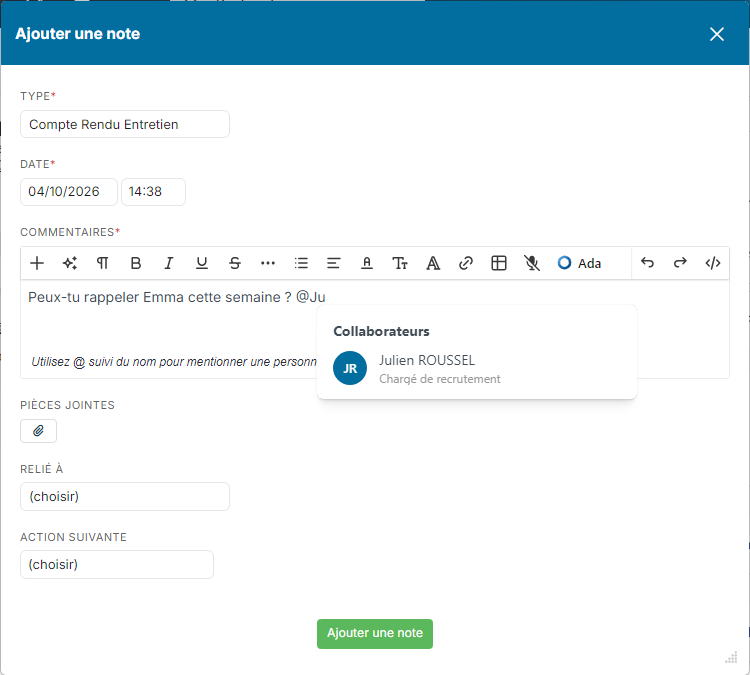
- Open the window to add a note, for example Add a note on a candidate's record. Below the text area, a hint reminds you: "Use @ followed by the name to mention someone".
- In Comments, type @ followed by the beginning of the employee's name, for example @Ju. Nicoka suggests the matching employees.
- Click the employee in the list: their name is inserted in the text.
- Mention other employees if needed, then save the note.
In an evaluation
Mentions also work in the free-text answers of an evaluation, whether it is opened from the star on the candidate's record or during a step change. Below each text area, a hint reminds you: "@name to mention someone, @all for the team".
- In a free-text answer, type @ followed by the beginning of the employee's name and pick them in the list.
- Save the evaluation: they receive an email with the answer they are mentioned in and a link to the evaluation, plus a notification.
If you later edit the evaluation without changing who is mentioned in an answer, no new email is sent. Questions bound to a field of the record (availability, mobility, etc.) do not offer mentions.
What the mentioned employee receives
- an email with the content of the note and a link to the record;
- if they have access to Nicoka, a notification in the bell of the top bar.
To choose the notifications you receive, see How to configure notifications.