Compute late payment interest on your invoices
When a customer pays an invoice after its due date, you can charge late payment interest. Nicoka computes it for you, invoice by invoice, from the rate set in your terms of sale. The amount shows in the invoice list, in your reports and in your payment reminders.
Set your rate
- In the side menu, open Settings > Modules, then click Settings on the Sales management card.
- Click Customizing points, then expand the Invoices section.
- In Late payment interest: annual rate (%), enter the annual rate set by your terms of sale, for example 10.5 for 10.5%.
- Click Save.
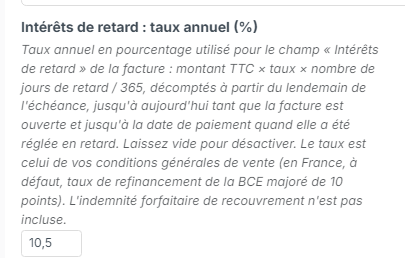
In France, when your terms of sale do not set a rate, the applicable rate is the European Central Bank rate plus 10 points. A contractual rate cannot be lower than three times the legal interest rate. As long as this field is empty, Nicoka computes no interest.
How the amount is computed
Late payment interest = amount incl. taxes × annual rate × days overdue / 365.
- Days overdue are counted from the day after the due date: an invoice due on 31 July is one day late on 1 August.
- While the invoice is unpaid, the count runs up to today and the amount grows every day. It applies to the remaining amount due.
- Once the invoice has been paid late, the count stops at the date of the last payment. The amount then applies to the invoice total incl. taxes.
- No interest is computed on a credit note, on an invoice that is not due yet, or on an invoice paid on time.
Example: an invoice of €1,200 incl. taxes due on 31 July, still unpaid 70 days later, with a 10.5% rate: 1,200 × 10.5% × 70 / 365 = €24.16.
The €40 flat recovery fee is not included in this amount.
Show the interest in the invoice list
- In the side menu, click Sales, then Invoices.
- Click Edit Columns and add Late payment interest, and Days overdue if it is not there yet.
- To see the longest delays first, sort the list on Days overdue.
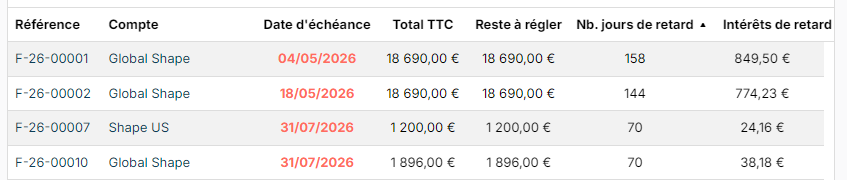
Both fields are also available in your invoice reports, for example to follow the total interest due per customer.
Quote the interest in your reminders
Late payment interest is an invoice field: you can insert it in your reminder email templates and in your document templates, like the invoice number or amount. Your reminder then states the interest accrued on the day it is sent, for example: "As of today, late payment interest amounts to €24.16".
With the reminder alerts, you can keep this amount for the last reminder, the formal notice for instance, and use a softer tone in the first ones. To create your templates, see Managing email templates. For the reminder alerts, see Tracking invoices and payments.
Invoice the penalties
The computed amount is for follow-up: it does not create any invoice. To charge the penalties to your customer, create an invoice with:
- a late payment interest line at the amount shown for each invoice concerned;
- where applicable, a flat recovery fee line of €40 per invoice paid late.
Neither amount is subject to VAT. Create them preferably as items of your catalog, without a VAT rate, so you can reuse them from one invoice to the next.