Create a job from an opportunity
When an opportunity leads to a recruitment, you can create the job straight from its sheet: the job takes over the account, the contact and the information already entered, and stays linked to the opportunity. This is enabled per opportunity type.
Depending on the vocabulary of your instance, the job may be called « Mission » or « Position », and the opportunity « Lead »: the labels of the tabs and actions follow.
Link an opportunity type to jobs
- Open Customizing > CRM, Opportunities section > Types.
- Edit the type and pick « Job » in Link to.
- Tick Disable related to fields if you do not want the « Job » section on the opportunity (see below).
- Save.
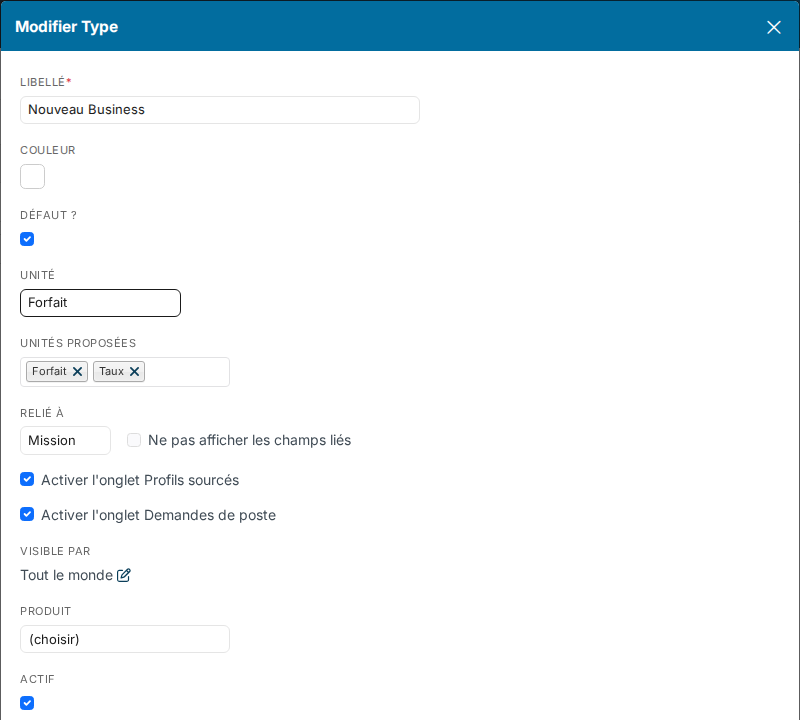
The setting applies to every opportunity of that type, including those created before it.
What the setting adds to the opportunity
- A Jobs tab, listing the jobs linked to the opportunity. You can add a job there, assign existing jobs or detach one.
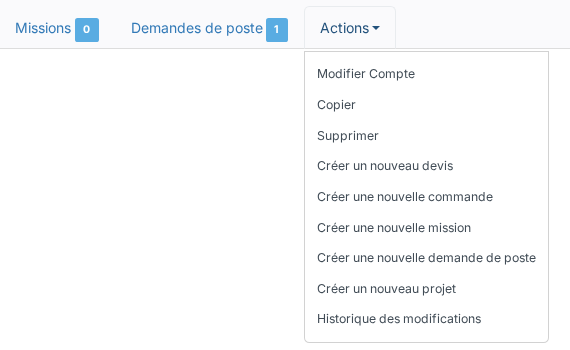
- The Create a new Job action in the Actions menu.
- A Job section in the sales follow-up of the opportunities created once the type is linked. It lets you prepare the job from the opportunity: contract type, employment type, industry, function… Only the fields active on jobs are offered.
Create the job
- Open the opportunity, then Actions > Create a new Job, or use the add button of the Jobs tab.
- The creation window opens prefilled: label, reference, description and currency of the opportunity, account and contact, and the values of the « Job » section.
- Complete and save: the job shows in the Jobs tab of the opportunity.
Good to know
- A job created elsewhere (Recruitment module, account sheet) is linked to the opportunity from its Jobs tab, Assign Jobs button.
- From an order, creating a job is not offered: create the job from the opportunity, then link the order to that job.
- To get a recruitment approved before creating the job, use job requests, which are enabled per opportunity type as well.
Were this information helpful?