Close candidate portal access on the hire date
The candidate portal is often used for pre-boarding: before starting, your future employee follows their onboarding path there and sends you their documents. Once hired, they no longer need it. A reminder on the hire date removes this access automatically, just as Nicoka already disables the account of an employee who leaves the company.
Create the reminder
- In the side menu, open Settings > Modules, then click Settings on the ATS card.
- In the Candidates section, click Reminders, then Create a new reminder.
- Fill in the window:
- Entity: Candidate;
- Label: for example "Close candidate portal on hire";
- trigger line: 0, Days, After, then Hire Date;
- Actions: Event, then Remove access.
- Click Create.
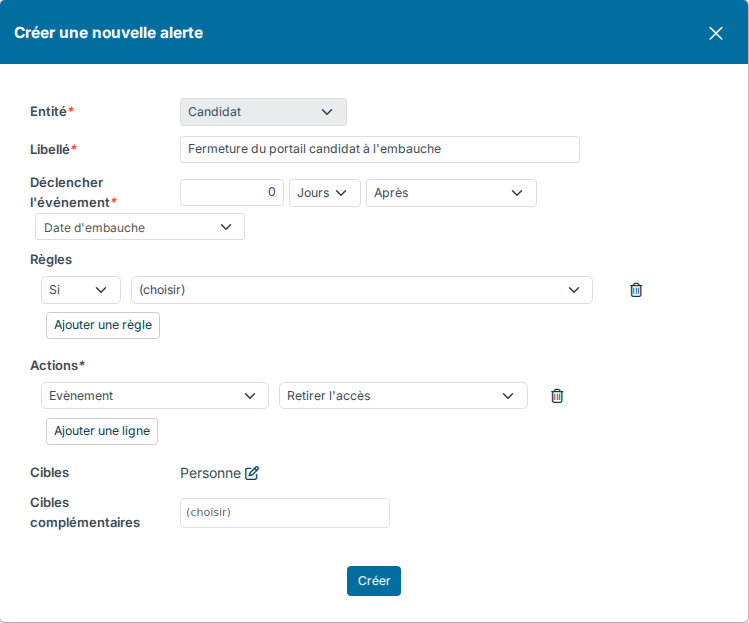
No rule is needed: the reminder only applies to candidates whose hire date falls on that day. Targets are not used by this action, leave them as they are.
What the reminder does
- On the hire date, the candidate's portal account is disabled: they can no longer log in.
- On the candidate record, the Portal Access field changes to No Access, and the change appears in the record's history.
- If the same account also gives access to Nicoka, for example as an employee, only the candidate portal access is removed: their other access stays open.
Good to know
- The reminder works from the day it is created: it does not close the access of candidates already hired. For them, open the Portal Access tab of the candidate record and click Remove access.
- To keep the access open for a few days after arrival, set a delay, for example 7 Days After.
- To learn more, see Reminders and events and Pre-boarding setup.
Were this information helpful?