Fill in an account's or supplier's identification from its SIRET
On an account or supplier sheet, Nicoka fetches a company's legal information from the public registers, so you do not have to type it in.
Import the data
- Open the account or supplier sheet, or create a new one.
- In the Identification block, click the magnifier to the right of the Identification Number field.
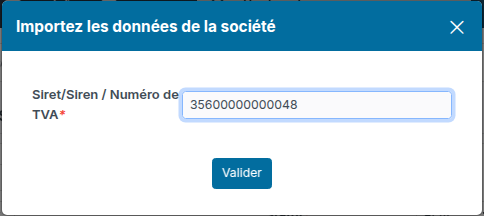
- Enter the company's SIRET, SIREN or EU VAT number, then validate.
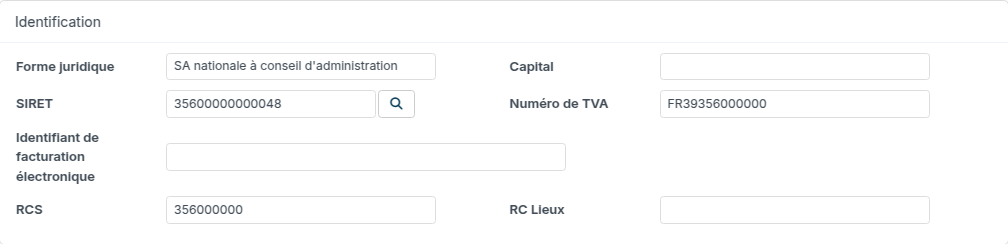
The fields of the sheet are filled in: all that is left is to save.
What is imported
- French company (SIRET or SIREN): company name, legal form, address, industry, workforce, year of creation, VAT number and trade register number. The Trade Reg. number is the SIREN, filled in for a company registered with the RCS (commercial company, non-trading company, EIG, public industrial and commercial body…).
- Company from another EU country (VAT number): VAT number, plus the company name and address when the member state publishes them in the VIES register.
Head office or establishment
A SIRET number (14 digits) identifies one specific establishment: Nicoka imports that establishment's address. A SIREN number (9 digits) identifies the company: Nicoka then imports the SIRET number and address of its head office, as does searching for the company by name when creating an account. For the account of a branch or secondary establishment, enter its own SIRET, then link it to its group: see Manage a group and its establishments.
What is left to enter
The Capital and the Trade Reg. Location (registry court city) are not published by the INSEE Sirene register: copy them from the company's Kbis extract or from its page on annuaire-entreprises.data.gouv.fr.
Running the magnifier again on an existing sheet replaces the values of the imported fields.