Using Leexi with Nicoka
Leexi records, transcribes and summarizes your calls and meetings. Once your account is connected, Nicoka automatically imports the related reports.
Before you start
- A Leexi administrator must be able to create an API key for your company.
- The API key must be allowed to access the calls of the Leexi account to connect.
- Each person who wants their calls imported connects their own Leexi account with their Leexi email address. The same company API key pair can be used for several accounts.
Step 1 — Create an API key in Leexi
- In Leexi, open Settings > Company Settings > API Keys.
- Create a key, for example named “Nicoka”.
- Copy its Key ID and Key Secret, and keep them safe.
Step 2 — Connect your account in Nicoka
- In Nicoka, open your profile, then Integrations, and select Leexi.
- Click Connect my Leexi account.
- Enter your Leexi account email address, the Key ID and the Key Secret.
- Confirm. Nicoka validates the key with Leexi and confirms the connection.
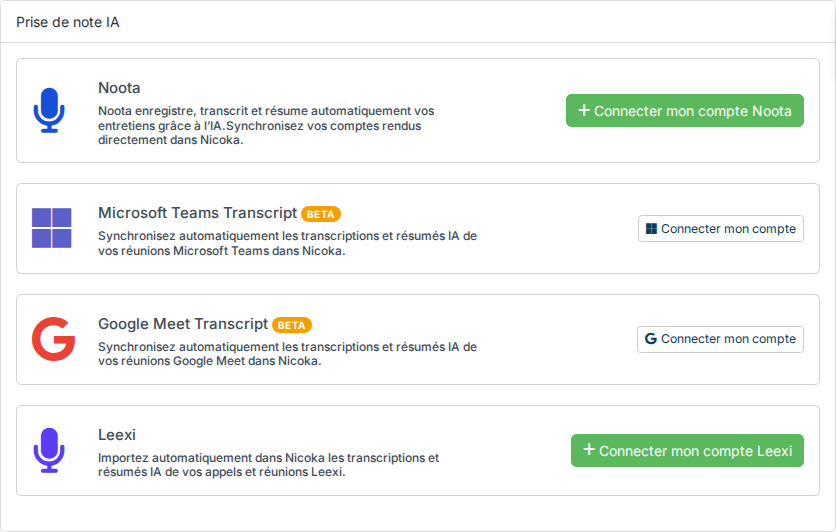
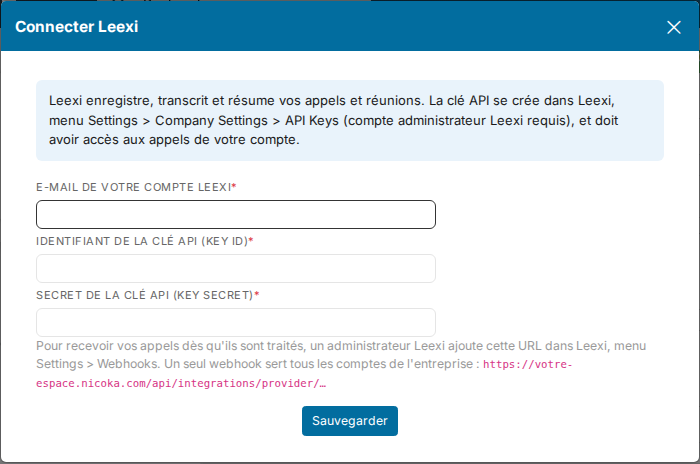
The connection page and the integration card display the webhook URL to add in Leexi. Copy that URL exactly: it is specific to your Nicoka workspace.
Step 3 — Add the webhook in Leexi
- In Leexi, open Settings > Webhooks.
- Add a webhook, for example named “Nicoka”.
- Paste the URL displayed by Nicoka after connecting your account.
- Enable the webhook.
One webhook serves every Leexi account in your company. Leexi then sends each processed call to Nicoka, which associates it with the connected account whose email address matches the call owner.
Leexi reports in Nicoka
As soon as a call or meeting is processed in Leexi, its report is automatically imported into Nicoka. If a call remains pending, check that the right Leexi account is connected and that its API key can access the call.
See also
Were this information helpful?