Merging accounts or companies
Two records for the same company, after an import or a double entry? Nicoka lets you merge them into one: the data of the absorbed record joins the record you keep, which thus retains the whole history. This article covers the merge of two accounts (CRM) and of two companies (the candidates' employers), and what is carried over in each case.
A merge cannot be undone. Open both records before confirming, and always start from the record you want to keep. For people, see Merging contacts.
Accounts or companies?
- Accounts are your CRM customers and prospects: CRM > Accounts menu. They carry the contacts, opportunities, quotations, orders and invoices.
- Companies are the businesses linked to candidates: their current employer and the companies of their experiences. They are managed in the Recruitment > Companies menu.
The merge works the same way for both, from the record you keep. It requires the update right and the delete right on the entity: without them, the Merge entry does not appear.
Merging two accounts
- Open the record of the account to keep.
- At the top of the record, open the Actions button and click Merge.
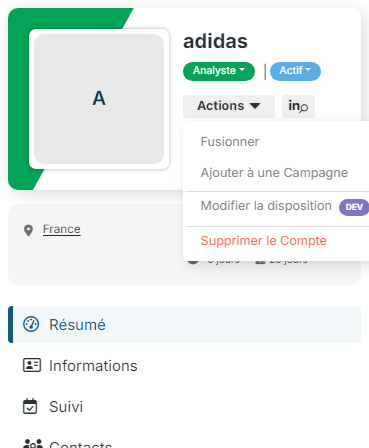
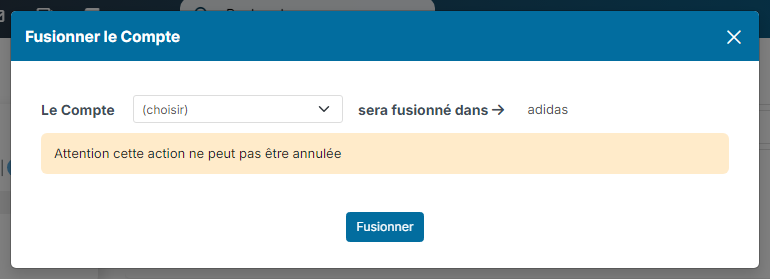
- In the Merge Customer window, pick the account to absorb in the This Customer field. The line reads from left to right: this account will be merged into the open account, whose name is shown on the right.
- Click Merge. The confirmation message appears and the kept record reloads.
The absorbed account is deleted. The kept record receives:
- the contacts: the people of the absorbed account are attached to the kept account, including those linked to it as a secondary account;
- the sales: opportunities, quotations, orders and invoices;
- the recruitment: the jobs of the absorbed account;
- the history: activities (notes, calls, emails), tasks, calendar events and documents;
- the owners and partners of the account, without duplicates;
- the sites (locations) and what is attached to them;
- the record data: phone, email, addresses, custom fields and external identifiers (Pappers, HubSpot…) are only carried over when they are empty on the kept record. The counters (number of jobs, opportunities, invoices) are added up.
Merging two companies
- Open the record of the company to keep, from Recruitment > Companies or from a candidate's experience.
- At the top of the record, open the Actions button and click Merge.
- In the Merge External Company window, pick the company to absorb in the This External Company field, then click Merge.
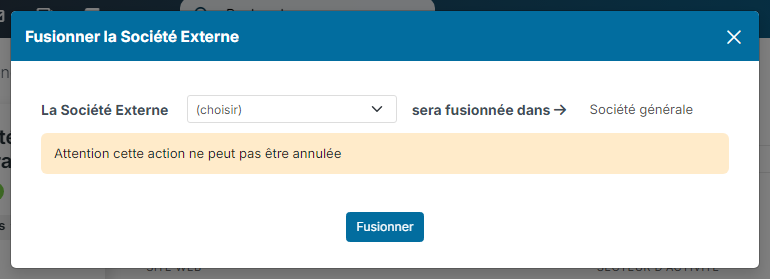
The absorbed company is deleted. The candidates whose current employer it was, and the experiences that mentioned it, now point to the kept company. The addresses, custom fields and external identifiers of the absorbed record fill the empty fields of the kept record.
Merging several companies at once
From the Recruitment > Companies list, you can process several duplicates in one go:
- Tick the companies concerned, then choose the Merge bulk action.
- The window lists the selected companies in red. Pick in the list the company to keep, then click Merge.
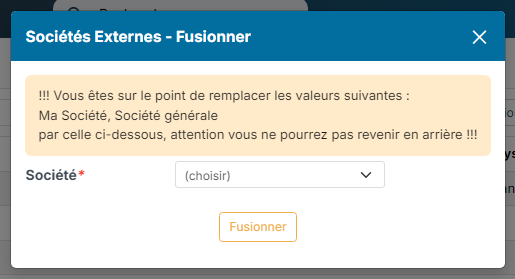
Every record that mentioned one of the selected companies (candidates, experiences, jobs…) is redirected to the kept company; the others are deleted. This action also requires the bulk update right on companies. It does not exist for accounts: merge them two by two from their record.
Frequently asked questions
Can a merge be undone?
No. The absorbed record is deleted and its data is spread over the kept record. Check both records before confirming.
What happens to conflicting information?
The kept record always has priority. A value of the absorbed record (phone, address, custom field) is only carried over when the matching field is empty on the kept record. Before merging, note the information you want to keep from the other record.
A contact was on both accounts?
They are attached only once to the kept account: the duplicate link is removed.
Can a merged company come back?
No. When a CV, a LinkedIn profile or an experience typed by hand names a merged company, Nicoka links the kept company instead of recreating the absorbed record. Likewise, « & », « ET » and « AND » are equivalent: « KAUFMAN AND BROAD » finds « KAUFMAN & BROAD ». To create a company again under the name of a merged record, add it from Recruitment > Companies.
How to avoid duplicates at import?
See Importing contacts or accounts into Nicoka CRM: the import matches existing records before creating new ones.