Reports on jobs (assignments, job offers)
Nicoka provides ready-to-use reports to monitor your recruitment: recruiter activity, progress of each job, candidate sources, time spent between steps, conversion rates… This article shows where to find them and what each one tells you.
Where to find the reports
- Across all your jobs: in the Recruitment menu, open the list of jobs and click Reports.
- For a single job: open the job, click Candidate Applications, then click Reports at the top of the candidate pipeline.
- On your dashboard: some reports are also available as widgets.
Most reports have a filter button (the funnel) to choose the period analysed, and a button to download the report to Excel.
Reports across all your jobs
In the list of jobs, click Reports. The menu offers the following reports.
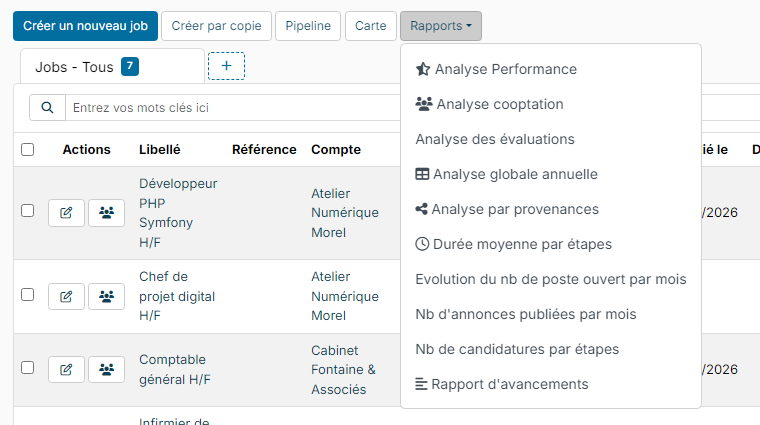
- Performance Analysis: the activity of each recruiter over the selected period: jobs and candidates created, candidates updated, candidates sourced, phone screenings planned, candidates selected, interviews, interview minutes, candidates tested…
- Advancement Report: a snapshot of your open jobs: account, assigned recruiter, number of open positions and number of candidates at each step. Click a figure to open the job directly at that step.
- Annual stafing report: a month-by-month table: new open positions, candidates sourced, spontaneous applications, applications from job boards, referrals, candidates moved into each step of your process, offers accepted or declined, average time to offer and time to hire.
- Cooptation analysis: the referred candidates, with the job concerned and the person who referred them.
- Evaluations report: the evaluations filled in on the candidates of your jobs for a given evaluation questionnaire (candidate, author, score, date and answers). First choose the questionnaire in the filters.
- Job - Applications Status: choose a job to display the list of its applications, with each candidate's step, status and, if disqualified, the reason. It is the same report as a job's Advancement Report (see below).
- Nb of announces published per month: a chart of the number of job ads published each month, to measure your posting activity and its seasonality.
- On Going Job per month: a chart of the number of jobs open each month, to follow your recruitment workload.
- Sourcing Report: for each candidate source (job board, LinkedIn, spontaneous application…) and each author of the application (the person who added the candidate to the job), the number of candidates in progress, disqualified and hired over the period. Ideal to find out which sources bring you the best candidates.
- Step Times: for each move from one step to the next, the average time in days, the number of applications and the pass rate. This shows you where applications get stuck.
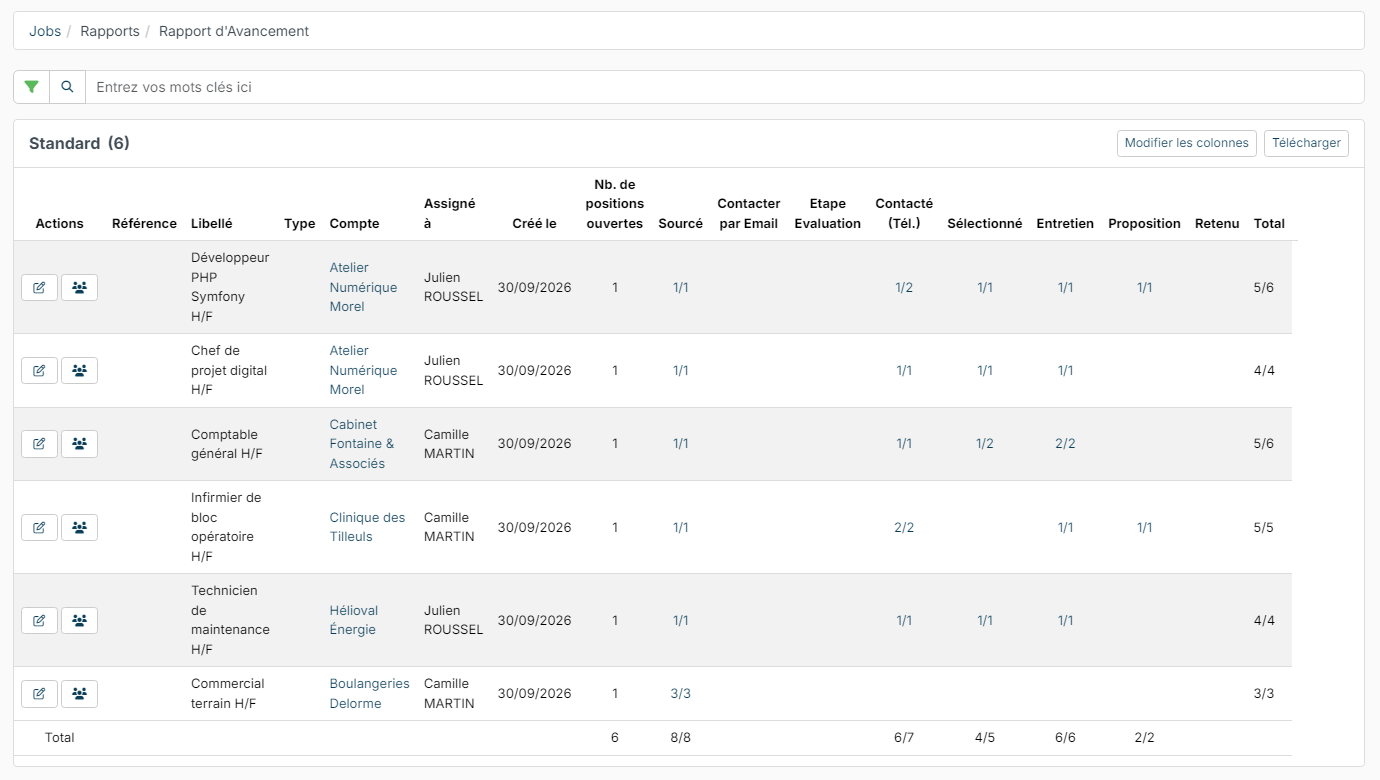
In the advancement report, "1/2" means that one candidate is still in progress out of the two who reached this step: the other one was disqualified.
Reports for a single job
- Open the job, then click Candidate Applications.
- At the top of the candidate pipeline, click Reports.

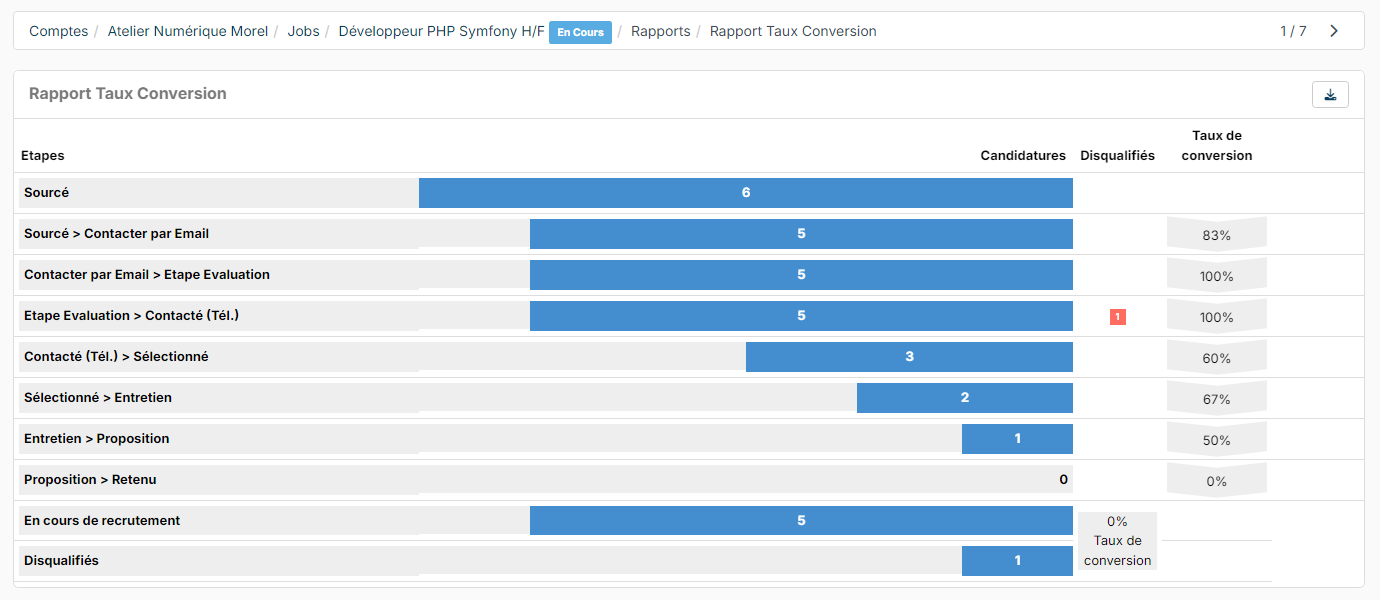
- Conversion Rate Report: for each move from one step to the next, the number of applications, the number of disqualified candidates and the conversion rate. At the bottom of the report: the number of candidates still in the recruitment process, the number of disqualified candidates and the overall conversion rate of the job.
- Advancement Report: the full list of the job's applications, with each candidate's step, source, status and, if disqualified, the reason.
Dashboard widgets
You can add these widgets to your dashboard (see Dashboard - Customization):
- Candidates actions analysis: the number of actions carried out by your employees on candidates (calls, emails, additions to a job, step changes, disqualifications…), period by period. The same report opens from the candidate list: see Candidates Activities Analysis report.
- Recruitment Kpis: the Performance Analysis report directly on your dashboard.
- My Jobs and My Assigned Jobs: your jobs with the number of candidates at each step. Click a step to open the job at that step.
- Open positions: the published offers, for your employees, who can apply internally or refer someone from there. See Internal mobility: open positions, internal applications and referrals.
Were this information helpful?